

AI Image Editor Online
The AI Image Editor lets you guide a photo with simple language. Describe the change, and the image adapts with natural clarity.
AI Image Editor
Model Version
Nano Banana
Fast results. Simple control. Create in seconds
Nano Banana Pro
Sharper details. Pro lighting. High-end visuals
Add
Example
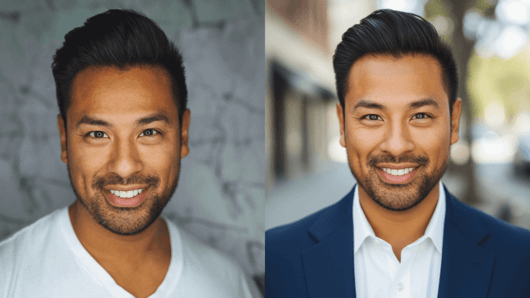
Convert to LinkedIn profile
Transform this casual photo into a professional LinkedIn headshot. The person should face the camera directly with natural eye contact and a confident
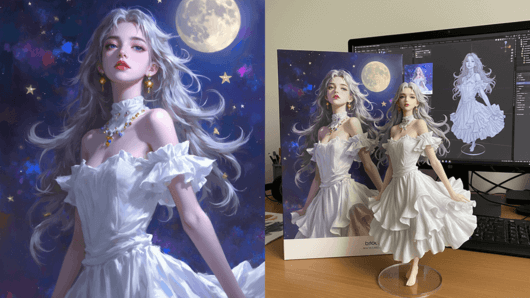
AI Action Figure Generator
Turn this photo into a character figure. Behind it, place a box with the character’s image printed on it, and a computer showing the Blender scene.
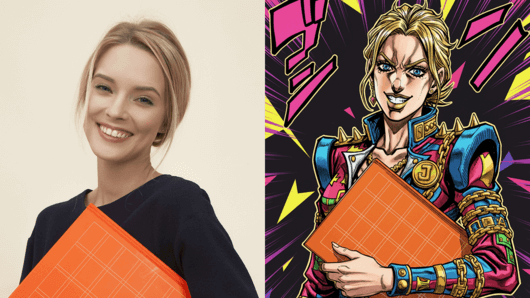
Convert to the style of JoJo
Transform this photo into a JoJo’s Bizarre Adventure style portrait. Keep the same face and pose but restyle it with bold anime line art, sharp shadows
6 Powerful Use Cases of AI Image Editing

Smart Object Removal

Prompt Driven Element Replacement

Seamless Background Switching

Social Media Visual Optimization

Product Photo Enhancement

Creative Style Transformation
Why Choose Our AI Image Editor?
Context-Aware Editing
Mask-Free Precision
Effortless Visual Cleanup
Identity-Safe Adjustments
Natural Language Control
Seamless Style Consistency
What is AI Image Editor?

Getting Started with the AI Image Editor

Upload Your Image
Add your photo by dragging it in or selecting it from your device.The editor supports common formats such as JPG, PNG and WebP up to 10MB.
Describe Your Edit
Write a short instruction that explains the change you want to see.The system interprets your description and adjusts the image accordingly.
Download Your Result
Review the updated version and apply any final refinements if needed.Save the finished image in the format and quality that suit your workflow.
About Image Editor FAQs
Do I need design experience to use this AI Image Editor?
You don’t need editing knowledge. You simply describe the change you want, and the AI photo editor interprets your instruction and completes the edit for you.
How accurately does the AI understand my editing requests?
The system performs reliably for common AI image editing tasks such as removing objects, adjusting colors or updating backgrounds. More detailed descriptions can help with complex edits.
Will the edited image look natural after AI processing?
Yes, the editor reads lighting, depth and context, allowing AI-generated changes to blend smoothly with the original photo for a realistic result.
How is my image data handled during AI editing?
All uploaded photos are processed securely and cleared automatically after a short period. Your files remain private and are never used for training or shared externally.
Can I undo a change or generate different AI variations?
Your original image stays intact. You can adjust your prompt, create variations or refine the edit until it matches your intended result.
Does the AI Image Editor work with phone photos?
Yes, it supports images from any device, including mobile photos, camera shots or downloaded images.
What if the AI doesn’t understand my edit request?
Providing more detail usually clarifies your intent. Mentioning colors, object positions or specific elements often leads to more accurate AI photo edits.
How does pricing work for the AI Image Editor?
You can try a limited number of edits for free. Subscriptions unlock higher volume, advanced features and faster editing workflows for regular users.

Experience Smarter Image Editing
Guide each photo with clear instructions and produce results that match your intention.