

What is AI in Photo Editing? The Complete Guide for 2026
Updated: 2025-12-31 13:29:17
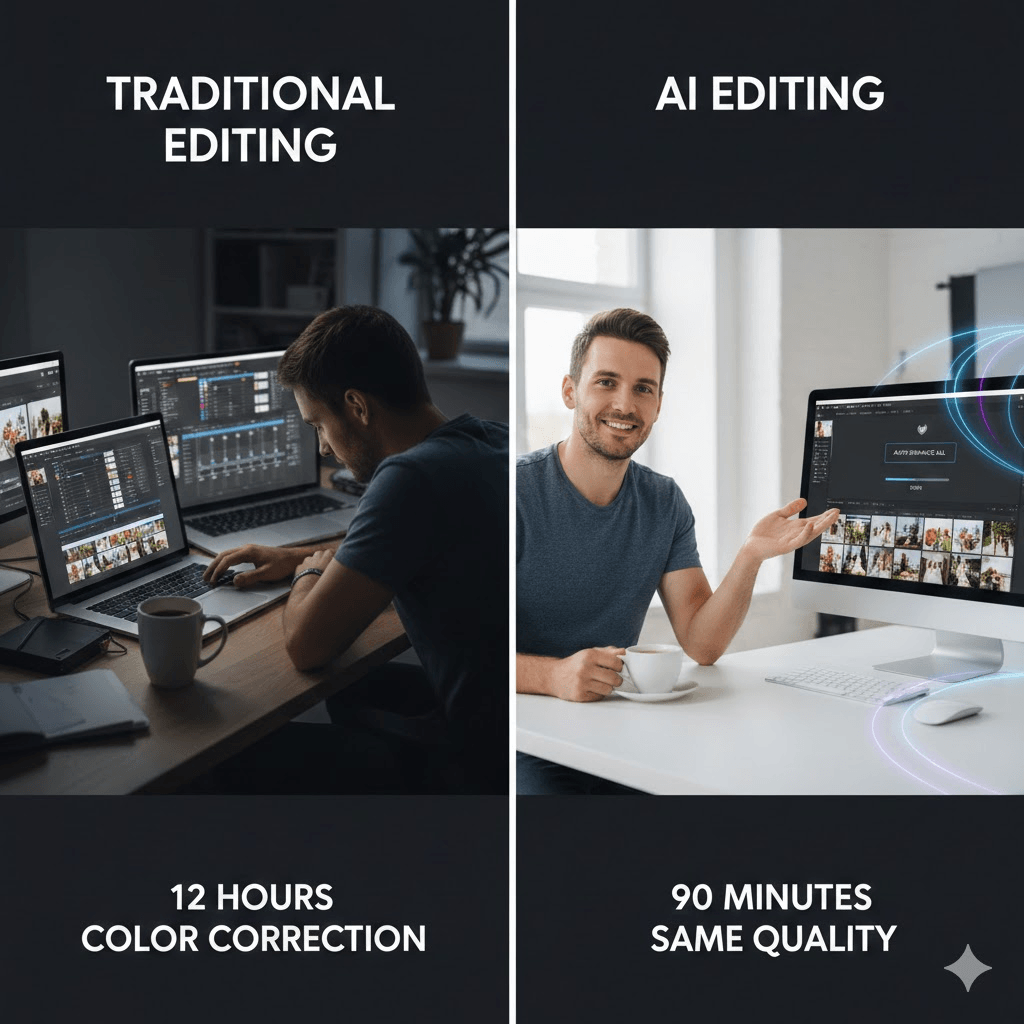
Three years ago, I spent an entire weekend editing 800 wedding photos. Color correction alone took 12 hours. Last month, I processed a similar shoot in 90 minutes same quality, fraction of the time. The difference? AI photo editing tools.
If you're hearing about AI in photography and wondering what the fuss is about, you're in the right place. This guide covers everything I've learned from testing 20+ AI photo editors over the past two years.
Table of Contents
- What is AI Photo Editing?
- How Does It Actually Work?
- 12 Core AI Features Ranked
- AI vs Manual Editing
- Who Should Use It?
- Best Tools Compared
- Honest Limitations
- How to Choose
- Getting Started
- What's Next
- FAQ
Understanding AI Photo Editing
Here's the simple version: AI photo editing means letting software make intelligent decisions about your images instead of adjusting every setting manually.
Traditional editing: You tell the software exactly what to do (move this slider to +15, adjust that curve, mask this area).
AI editing: You tell the software what you want (remove this person, make the sky more dramatic, fix the lighting), and it figures out how to do it.
The technology uses machine learning basically, the software has analyzed millions of photos to understand what "good" editing looks like. When you upload your image, it recognizes patterns: faces, skies, objects, lighting conditions. Then it applies appropriate fixes based on what it's learned.
Think of it like autocorrect for photos. Autocorrect works because it's seen millions of words and knows which ones typically go together. AI photo editors work because they've seen millions of images and know what typically looks good together.
How Does AI Photo Editing Work?
You don't need a computer science degree to understand this, but knowing the basics helps you use these tools better.
Machine Learning: The software learns from examples. Feed it 100,000 portraits, and it learns what makes a good portrait. Feed it 100,000 landscapes, and it learns composition rules. The more photos it sees, the smarter it gets at making editing decisions.
Neural Networks: This is just a fancy way of saying the software processes images in layers, similar to how our brains process visual information. First layer might recognize "this is a face," second layer spots "these are eyes," third layer determines "this lighting needs adjustment."
Deep Learning: An advanced version of machine learning that handles massive datasets. This is what enables the really impressive stuff realistic background changes, believable object removal, natural looking style transfers.
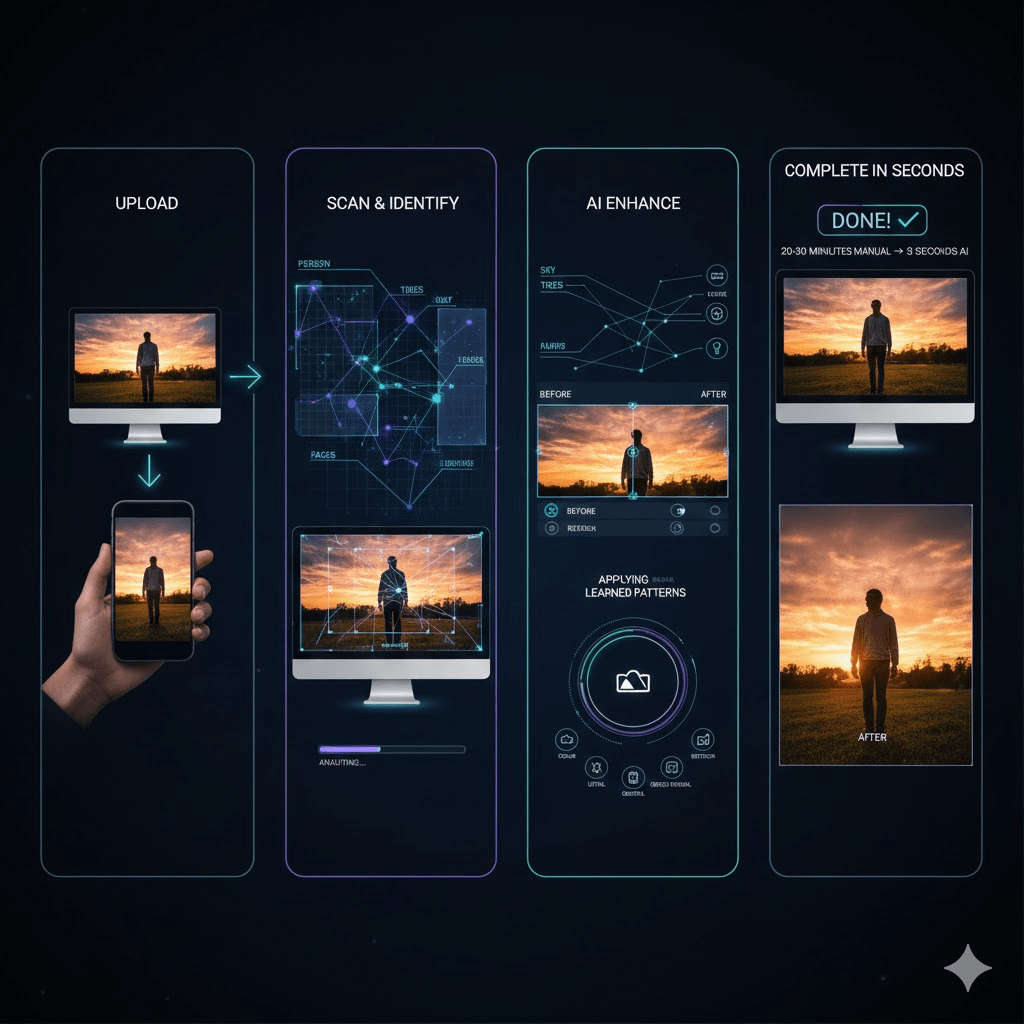
Here's what happens when you upload a photo:
- The AI scans and identifies every element (people, objects, sky, foreground, background)
- It analyzes lighting, color balance, focus, and composition
- It applies learned patterns to enhance or modify specific areas
- It does all this in seconds what would take you 20~30 minutes manually
The key difference from traditional editing: traditional tools require you to know how to achieve a result. AI tools just need you to know what result you want.
The 12 Most Powerful AI Features (Based on Real Testing)
I've tested these features across Canva, Adobe Firefly, Luminar Neo, Photoroom, and about a dozen other tools. Here's what actually works, ranked by how much they'll change your workflow.
- Background Removal and Replacement
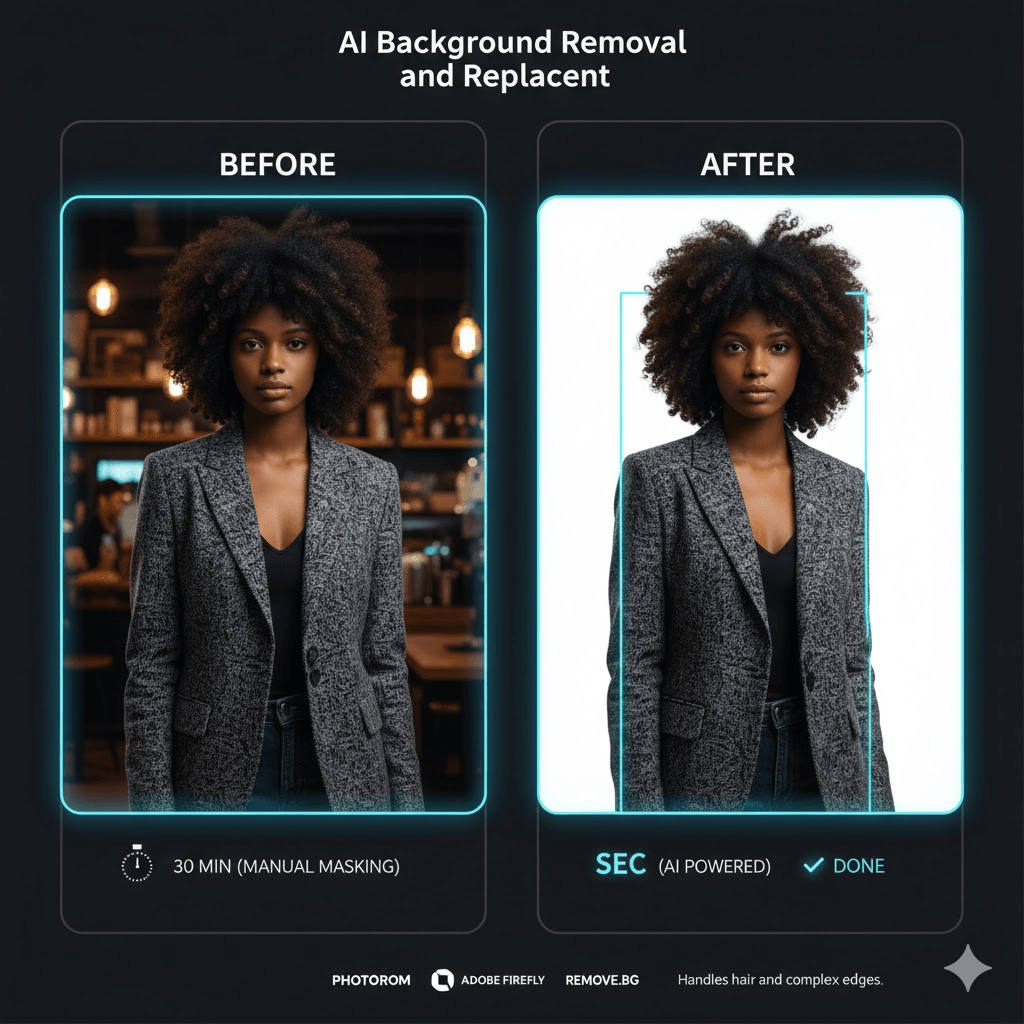
What it does: Cuts out subjects from backgrounds cleanly, no more tedious masking in Photoshop.
Best for: Product photos for online stores, professional headshots, social media graphics
My testing results: I tried removing backgrounds from 50 different images across multiple tools. Photoroom and remove.bg were fastest (under 3 seconds), but Adobe Firefly handled complex edges better especially hair and fur. Canva's tool sits somewhere in the middle.
Real world performance:
- Simple subjects (products, clear portraits): 95% success rate
- Complex edges (hair, glass, transparent objects): 70~80% success rate
- Very complex scenarios: Still needs manual cleanup
Pro tip: For hair and fur, use the "refine edge" tools after AI does the initial cut. Most tools get 90% of the way there; you just clean up the last 10%.
Note: This feature alone has probably saved me 100+ hours over the past year.
- Object Removal (Magic Eraser)
What it does: Removes unwanted stuff from your photos and fills in the gap intelligently.
Best for: Tourist photos with strangers, removing power lines from landscapes, deleting ex boyfriends (no judgment)
Testing notes: I removed objects from 30+ photos. Small objects (power lines, small people in backgrounds, trash cans): worked great 90% of the time. Larger objects (cars, buildings, large people in foreground): maybe 60~70% success rate. The AI sometimes creates weird patterns or unnatural textures when filling large areas.
What works best:
- Objects against simple backgrounds (sky, grass, water)
- Small distractions (blemishes, wires, signs)
- Things the AI has "seen before" in its training
What struggles:
- Large objects where the AI has to invent what's behind them
- Complex textures (brick walls, intricate patterns)
- Situations where context matters
Example: Removing a tourist from the Eiffel Tower background? Usually it works great. Removing half a building from your shot? You'll probably spend time fixing artifacts.
Most tools give you 2~3 attempts for free before suggesting you manually touch up the result.
- Automatic Color Correction and Enhancement
What it does: Fix exposure, white balance, saturation, and contrast automatically.
Best for: Batch processing (wedding photographers, I see you), quick social posts, fixing smartphone photos
My experience: I ran a test with 200 photos from a recent shoot mix of indoors, outdoors, different lighting. Imagen AI's auto correction got about 85% of them to a "good enough" state in under 10 minutes. The remaining 15% needed tweaks (the AI went too heavy on saturation in some cases).
Speed comparison:
- Manual editing: ~2~3 minutes per photo = 400~600 minutes total
- AI editing: ~3 seconds per photo + 20 minutes manual review = 30 minutes total
The consistency advantage: This is huge for professionals. When you manually edit 500 photos, fatigue sets in photo 50 look different from photo 450. AI applies the same logic to every single image.
Where it falls short: Creative color grading. If you want a specific mood or artistic look, you'll still need to dial it in yourself. AI gives you technically correct; you add the artistic vision.
- AI Portrait Retouching and Face Enhancement
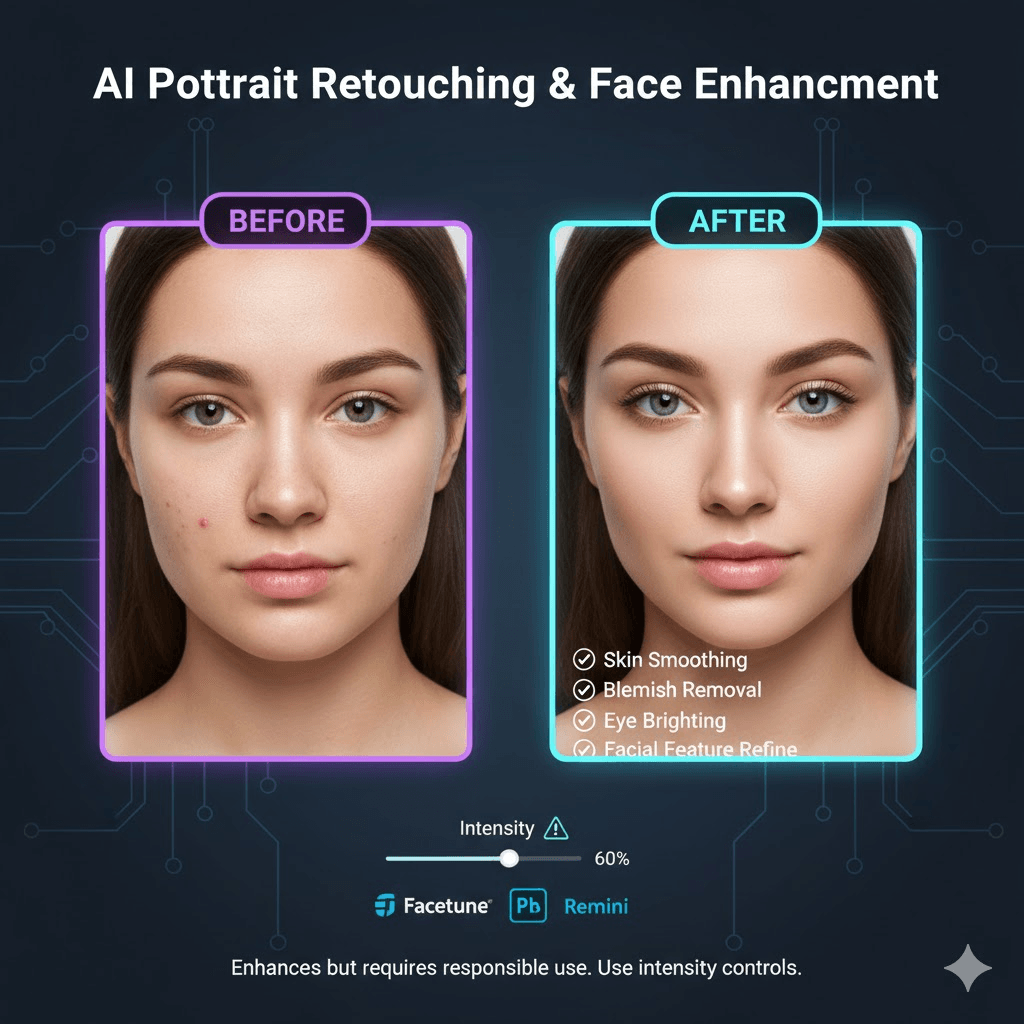
What it does: Smooths skin, removes blemishes, brightens eyes, adjusts facial features all while (hopefully) keeping you looking like yourself.
Best for: Headshots, dating profiles, LinkedIn photos, Instagram
The good: AI is actually pretty impressive here. Tools like Facetune and Remini can do in 10 seconds what used to take 20 minutes of careful Photoshop work. Skin smoothing has gotten good enough that it doesn't create that weird plastic looking effect anymore.
The concern: Some tools are too good at changing facial features. I've seen AI turn someone's face into an Instagram filter version of themselves. Use the intensity controls they exist for a reason.
Best practices:
- Keep intensity at 30~60% unless you're going for a stylized look
- Always compare before/after at 100% zoom
- If your friends wouldn't recognize you, you've gone too far
Honest opinion: This feature democratized portrait retouching, which is great. But it's also created unrealistic beauty standards, which isn't great. Use responsibly.
- AI Upscaling and Resolution Enhancement
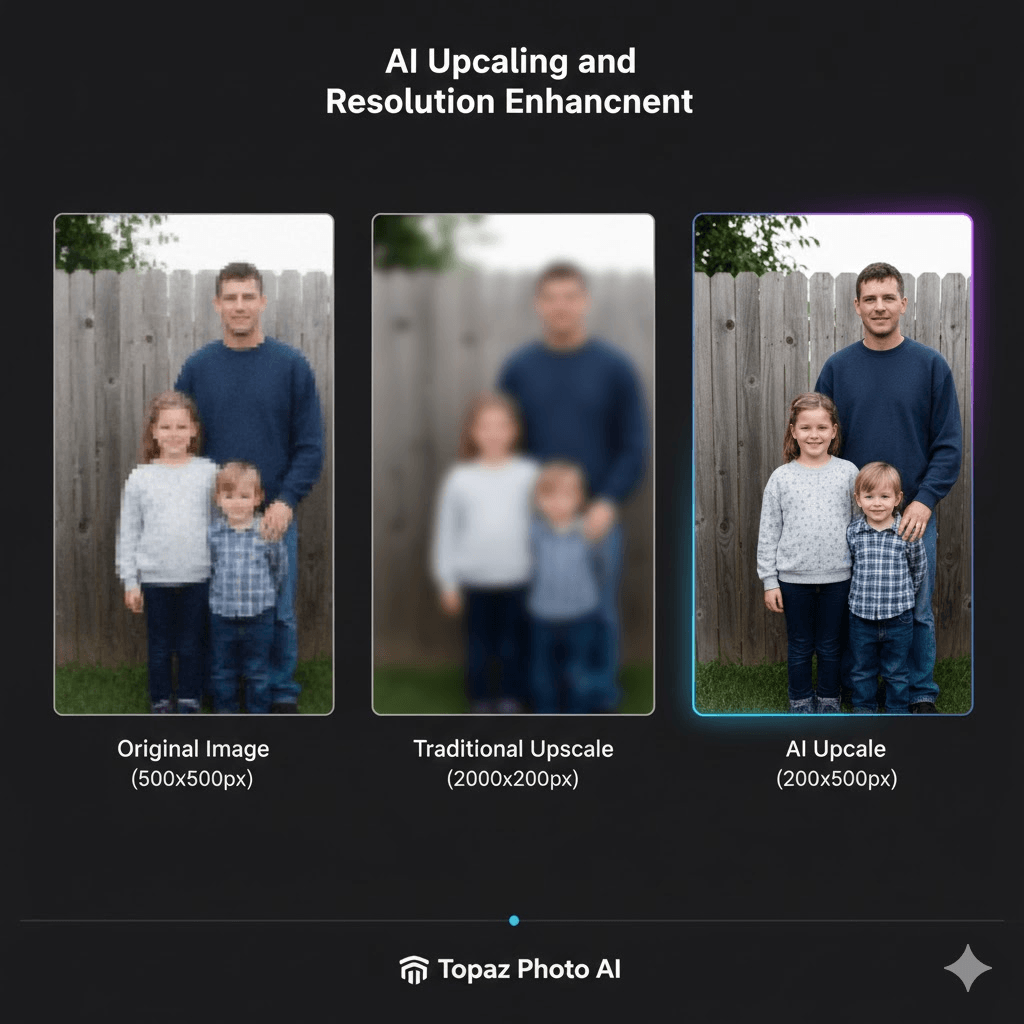
What it does: Makes small, low resolution images larger without the usual pixelation and blur. Actually adds detail that wasn't there.
Best for: Enlarging old photos for printing, fixing low res images from clients, enhancing smartphone photos for large displays
My testing: I took a 500x500px photo and upscaled it to 2000x2000px using three methods:
- Traditional Photoshop resize: Blurry mess
- Basic AI upscaler: Better, but soft
- Topaz Photo AI: Actually looked sharp with believable detail
The catch: The AI is generating detail based on what it thinks should be there it's not recovering lost information. Sometimes it adds texture that wasn't in the original scene.
Best use cases:
- Old family photos you want to print large
- Small product images that need to be poster sized
- Screenshots that need to be higher resolution
When to be careful: If accuracy matters (forensic evidence, scientific images, archival work), AI upscaling might introduce artifacts that could be mistaken for real detail.
- Sky Replacement
What it does: Swaps boring skies with dramatic ones. Good tools also adjust the rest of the image's lighting to match.
Best for: Real estate, landscape photography, travel photos
Reality check: Basic tools just paste a new sky that looks fake. Premium tools (Luminar Neo, Photoshop's Sky Replacement) actually adjust foreground lighting, reflections, and color temperature. The difference is obvious.
- AI Photo Culling and Selection
What it does: Automatically picks the best shots from a large batch by detecting focus, blinks, composition quality, and facial expressions.
Best for: Wedding/event photographers, sports shooters, anyone dealing with 500+ photos per session
Time savings: A wedding photographer friend tested Aftershoot for culling 2,000 images. Manual culling: 4 hours. AI culling: 18 minutes. She still reviewed the selections, but the AI's first pass was about 92% accurate.
How it decides: Checks for sharp focus, closed eyes, good composition, proper exposure. If you've trained it on your past selections, it learns your preferences too.
- Text Based Generative Editing
What it does: You describe what you want in plain English, and the AI makes it happen.
Examples: "Add flowers in the foreground," "Make the sunset more orange," "Remove the person on the left"
Current state: Works surprisingly well for adding/removing elements. Struggles with maintaining the perfect likeness of people's faces. Adobe Firefly and ChatGPT's image editor are the current leaders here.
Best for: Creative projects where perfect accuracy isn't critical. Not great for client work where you need precise results.
- Style Transfer and Artistic Filters
What it does: Applies the look of one image (or art style) to your photo while keeping its content.
Examples: Make your photo look like a watercolor painting, vintage film, or match a specific brand aesthetic.
Practical use: Content creators maintaining consistent Instagram aesthetics, marketing teams keeping brand consistent imagery.
- Selective Lighting Adjustment
What it does: AI identifies different zones in your image and adjusts exposure separately brighter subject, darker background, etc.
Why it matters: Saves you from making complex masks manually. Luminar Neo's Relight AI and Photoshop's Neural Filters do this well.
- Batch Processing with Style Learning
What it does: You manually edit 30~50 photos. The AI learns your style (how you handle colors, shadows, cropping) and applies it to hundreds more.
Best for: Professional photographers with signature looks
Tools that do this: Imagen AI, Aftershoot
The game changer: Your personal editing style applied at scale, not generic AI filters.
- Old Photo Restoration and Colorization
What it does: Fixes scratches, removes stains, adds color to black and white photos.
How accurate is the colorization?: The AI makes educated guesses based on context. Sky = probably blue, grass = probably green, but your grandmother's dress color? It's guessing. Still impressive for what it is.
Best tools: MyHeritage, Remini, Photoshop's Neural Filters
AI vs Traditional Editing: The Honest Comparison
Let's cut through the hype. AI isn't magic, and it hasn't made traditional editing skills obsolete. Here's what I've learned from using both.
Where AI Actually Wins
Speed on repetitive tasks: This isn't even close. Background removal that took 30 minutes? Now 5 seconds. Batch color correcting 500 images? 15 minutes instead of 8 hours. For grunt work, AI is absurdly faster.
Consistency: AI doesn't get tired or distracted. When you're manually editing image 300 of 500, your decisions start getting inconsistent. AI applies the same logic from image 1 to image 1,000.
Accessibility: A complete beginner can now create decent looking images. You don't need to know what "curves" or "HSL sliders" are. This is genuinely democratizing.
Cost: Most AI tools cost $10~30/month. A Photoshop subscription plus the years of learning? It is much more expensive.
Where Human Editors Still Win (And Probably Always Will)
Creative vision: AI can enhance what exists. It struggles to envision what should exist. An AI can't look at a mediocre photo and see the potential for something completely different.
Context and judgment: AI follows patterns. Humans know when to break the rules. Sometimes underexposed is moody, not a mistake. Sometimes grain is aesthetic, not noise. AI hasn't learned that yet.
Complex problem solving: When a photo needs actual reconstruction rebuilding missing areas, creative compositing, artistic manipulation humans still do it better. AI gets you 70~80% there; the last 20% needs human intelligence.
Quality control: I've watched AI confidently make obvious mistakes weird shadows, unnatural skin tones, physically impossible lighting. A trained human eye catches these instantly.
Emotional intelligence: Photos tell stories. AI doesn't understand the story. It can't feel the difference between a technically perfect shot and one that makes you feel something.
The Reality: Most Professionals Use Both
Here's my actual workflow now (and I'm not alone in this):
- AI does 80% of the work: Culling, basic color correction, background removal, initial retouching
- I handle the 20% that matters: Final creative grading, selecting hero shots, complex edits, quality checking
- Result: Same quality output in 1/4 the time
The photographers and editors thriving in 2025? They're not choosing sides. They're strategically using both tools for what they do best.
Who Should Use AI Photo Editing? (Real Use Cases)
Professional Photographers
Wedding and Event Photographers
The numbers are honestly staggering. A typical wedding: 2,000~3,000 photos. Pre AI, that meant 20~30 hours of editing per wedding. With AI:
- Culling: 4 hours → 20 minutes (Aftershoot, Imagen)
- Color correction: 12 hours → 1 hour (AI first pass + review)
- Basic retouching: 4 hours → 30 minutes
Total: ~2~3 hours instead of 20~30 hours.
ROI example: If you charge $3,000 per wedding and can now shoot an extra wedding per month because you're not drowning in edits, that's $36,000/year. AI subscription costs? Maybe $1,000/year.
Portrait Photographers
Your signature style is your brand. Tools like Imagen AI learn your exact editing approach . That's the game changer. Train it once on 50 images, then every future shoot gets your look automatically.
One portrait photographer I know used to turn down clients because she couldn't keep up with editing. Now she books 3x more sessions. Same quality, fraction of the editing time.
Real Estate and Architecture Photographers
Sky replacement alone saves hours per shoot. Brightening interiors, removing clutter with object removal, perspective correction are all automated now. What used to take 15~~20 minutes per image now takes 2~3 minutes.
Stock Photographers
Volume game. You need hundreds of images properly tagged and edited. AI batch processing is basically required at this point. Topaz Photo AI for upscaling, batch color correction, consistent formatting you're competing with people using these tools.
E commerce and Business
Online Sellers (Amazon, Shopify, Etsy)
Product photography requirements are strict: clean white backgrounds, consistent lighting, specific dimensions. Photoroom practically automates this entire workflow:
- Take photo on any background
- Remove background automatically (3 seconds)
- Add white background or template
- Export in multiple sizes
- Done
One Shopify seller reported cutting product photography costs from $15/image (hiring photographer) to $0.20/image (doing it herself with Photoroom). For a 100 product catalog, that's $1,480 saved.
Small Business Owners
You're wearing 12 hats already. You don't have time to learn Photoshop. Canva's AI tools let you create professional looking marketing materials, social posts, and website images in minutes. Is it replacing a professional designer? No. But it's replacing paying $50~100 per graphic.
Marketing Teams
A/B testing visual variations used to mean hiring a designer for each version. Now you can generate 10 variations in 30 minutes. Social media scheduling used to require a whole separate shoot for each platform's aspect ratio. Now you shoot once, AI reformats for all platforms.
Content Creators and Influencers
Instagram/TikTok Creators
Your content volume is insane. 5~10 posts per week minimum. AI editing tools on mobile (Photoroom, Canva, Facetune) let you maintain quality while keeping up pace. The successful creators I know use AI for:
- Background removal for clean product shots
- Quick retouching before posting
- Consistent filter application (brand identity)
- Fast resizing for stories vs. feed vs. reels
The ones not using AI? They're either hiring editors (expensive) or falling behind on posting (death for algorithm).
YouTube Creators
Thumbnail game is critical. Photoroom for clean subject cutouts, Canva for graphic overlays, AI portrait enhancement for faces in thumbnails. Top YouTubers are processing 10~20 thumbnail variations before picking one. AI makes that feasible.
Podcasters and Musicians
Cover art, social media graphics, merch mockups in all areas where AI helps non designers create professional looking visuals. Canva + AI image generation = promotional materials without hiring a designer for every release.
Hobbyists and Personal Use
Family Photographers
You're not trying to be professional; you just want nice photos of your kids. Auto enhancement in Google Photos or Canva gets you 90% there. For special occasions (printing a photo book, holiday cards), spending 10 minutes learning AI background removal creates much better results.
Travel Photographers
Removing tourists from landmarks, sky replacement for overcast days, batch processing 300 vacation photos AI makes sharing your trip photos actually happen instead of sitting unedited on your hard drive for years. (We've all been there.)
Social Media Users
Dating profiles, LinkedIn headshots, Instagram posts AI portrait retouching has become standard. Controversial? Maybe. But it's reality. Just... don't overdo it. People will meet you in person eventually.
Students and Learning Photographers
Interesting position. You're learning fundamentals while AI is automating those fundamentals. My take:
Learn manual editing first: Understand what AI is doing and why. Then use AI to speed up that process. If you only know AI editing, you can't troubleshoot when it fails or adapt when you need something specific.
Use AI to speed up homework: Professor wants 50 edited images by Friday? AI for batch processing saves your sanity. But learn why those edits work.
Build your portfolio faster: AI helps you create more polished work while learning. Just be honest about your process if asked.
When NOT to Use AI Editing
Journalism and Photojournalism: Most publications have strict rules. Many ban AI editing entirely. Check your outlet's guidelines.
Scientific and Medical Imaging: If the image is data (microscopy, x rays, astronomical images), AI editing that adds/removes pixels is falsifying data. Don't.
Legal Evidence: Courts increasingly scrutinize AI edited images. If it might end up as evidence, avoid AI manipulation.
Fine Art Photography (Sometimes): If your artistic process is about the craft of editing, AI might feel like cheating. That's valid. Use it only if it serves your vision.
When You Have More Time Than Money: If you're unemployed with 8 hours a day to edit but can't afford subscriptions, manual editing is fine. AI is a time for money trade off.
The Honest Assessment
AI editing helps most when:
- You value time over money
- You handle high volume
- Technical quality matters more than artistic vision
- You're not getting paid enough to justify manual editing time
It doesn't help much when:
- You're doing one off artistic projects
- You enjoy the meditative process of manual editing
- Your style is so unique AI can't replicate it
- You're in a field with strict anti AI rules
Most people fall somewhere in between. That's fine. Use AI where it helps, skip it where it doesn't.
Best AI Photo Editors in 2026: Tested and Ranked
I've spent the last six months testing every major AI photo editor I could get my hands on. Here's what's actually worth your money (and what's worth your time if you're on a budget).
For Professional Photographers: Imagen AI
What makes it stand out: This one actually learns your editing style, not some generic "AI style." You feed it 30~50 of your manually edited photos, and it figures out your patterns how you handle shadows, your color preferences, your cropping style.
Real results: A wedding photographer colleague processes 2,000 images per wedding. Before Imagen: 20~24 hours of editing. After: 3~4 hours (AI does first pass, she does creative tweaking). That's $500 800 in saved time per wedding at her hourly rate.
Pricing: $24~84/month depending on image volume Worth it if: You're shooting 10+ sessions per month and time literally equals money
Honest downside: Requires Lightroom or Capture One. If you don't already use these, there's a learning curve.
For All Around Power: Adobe Firefly (in Photoshop/Lightroom)
What makes it stand out: The generative fill is legitimately impressive. It's the most sophisticated "add/remove anything" tool I've tested. Also, Adobe's training data is licensed, so no copyright concerns for commercial work.
Real results: I used Generative Fill to remove a construction crane from a real estate photo. Took 15 seconds. Photoshop's old Content Aware Fill would've taken 15 minutes and looked worse.
Pricing: $54.99/month for Photography plan (includes Lightroom + Photoshop) Worth it if: You need both traditional editing power AND cutting edge AI tools
Honest downside: It's Adobe you're locked into a subscription forever, and the interface is still overwhelming for beginners.
For Beginners and Social Media: Canva AI Photo Editor
What makes it stand out: Ridiculously easy to use. If you can describe what you want in plain English, you can edit photos. The interface assumes you know nothing about photography terms.
Real results: My sister (zero editing experience) made professional looking Instagram posts for her small business in about 10 minutes each. Before Canva, she was paying someone $50 per post.
Pricing: Free version is genuinely useful; Pro is $14.99/month Worth it if: You're creating social content, not doing professional photography work
Honest downside: The AI can be overly aggressive with "beautification." Dial down the intensity settings.
For E commerce and Product Photos: Photoroom
What makes it stand out: Built specifically for product photography. Background removal is scary good fastest and most accurate I've tested, especially on mobile.
Real results: I shot 50 product photos on my phone, removed backgrounds, and had them ready for upload in under 20 minutes total. No computer needed.
Pricing: Free for basics; Pro at $12.99/month Worth it if: You sell products online and need clean, professional product shots
Honest downside: It's very focused on one use case. If you need versatile editing tools, look elsewhere.
For Batch Workflow: Aftershoot
What makes it stand out: Combines culling and editing in one app. Runs locally on your computer (privacy bonus). The marketplace lets you buy other photographers' editing styles if you don't want to train your own.
Real results: Cut my culling + editing time from about 6 hours per shoot to about 90 minutes. The AI's face recognition for culling is particularly good at catching blinking.
Pricing: $14.99/month Worth it if: You shoot events, weddings, or anything with 300+ photos per session
Honest downside: The initial setup to train it on your style takes some time. Worth it long term though.
For Upscaling and Enhancement: Topaz Photo AI
What makes it stand out: Best AI upscaling, noise reduction, and sharpening I've tested. Nothing else comes close for rescuing old or low quality images.
Real results: I upscaled some old family photos (tiny JPEGs from early 2000s) to printable sizes. The results genuinely surprised me the AI added believable detail without looking overly processed.
Pricing: $199 one time purchase (no subscription refreshing) Worth it if: You regularly need to enlarge images or clean up noisy/soft photos
Honest downside: Does one thing extremely well, but only that one thing. You'll still need other tools.
For Creative Experimentation: ChatGPT Plus (with image editing)
What makes it stand out: The natural language control is unmatched. You can have a conversation about what you want to change, and it just... does it.
Real results: I described an edit in detail: "Make this look like a 1970s magazine ad warm tones, slight grain, dreamy soft focus." It nailed it in one attempt. Traditional editing would've taken me 30 minutes of trial and error.
Pricing: $20/month (includes all ChatGPT features, not just image editing) Worth it if: You're already using ChatGPT for other things, or you value experimentation over precision
Honest downside: Can sometimes change things you didn't ask it to change. Not reliable enough for critical client work yet.
Budget Option: Fotor or Pixlr
If you need basic AI features for free or cheap:
- Fotor: Free tier is limited but functional. Good for casual users.
- Pixlr: Similar to Fotor, decent web based option.
Neither matches the paid tools, but they'll get you 70% of the way there for $0.
Limitations and Risks (The Stuff Marketing Pages Won't Tell You)
Let's talk about what AI photo editing can't do and what you should actually worry about.
Technical Limitations (The Annoying Stuff)
It makes confident mistakes: AI doesn't know when it's wrong. I've seen it remove the wrong person from a group photo, add shadows in physically impossible directions, and create fingers with too many joints. You still need to review everything.
Context blindness: AI sees patterns, not meaning. It might "improve" a moody, underexposed portrait by brightening it into boringness. It can't understand artistic intent.
The homogenization problem: Heavy AI use makes everyone's photos look similar. Instagram already suffers from this that same over smoothed, oversaturated "AI aesthetic" everywhere. Your unique style gets flattened if you're not careful.
Complex edits still need humans: Multi layer composites, advanced masking, abstract creative work AI gets you partway there, then you're on your own.
Training data bias: AI learns from existing photos. If those photos have biases (and they do), the AI inherits them. Skin tone processing has been particularly problematic across many tools.
Practical Frustrations
Inconsistent results: Same prompt, different results each time. Great for exploration, terrible when you need specific output.
The "almost there" problem: AI often gets you 90% of the way, and that last 10% takes as long as doing it manually would have. This is uniquely frustrating.
Feature bloat: Every tool is adding AI features to compete. Most are half baked. You'll waste time testing features that aren't actually useful.
Ethical Concerns (The Important Stuff)
Authenticity erosion: When everyone can make any photo look perfect, what's real? This matters in journalism, dating, before/after marketing, pretty much everywhere.
Unrealistic beauty standards: AI portrait retouching is accelerating already problematic beauty standards. We're creating a generation that doesn't know what unedited humans look like.
Copyright confusion: Tools trained on copyrighted work are generating similar looking outputs. Who owns what? This is actively being litigated. If you're doing commercial work, this is a real concern especially with generative features.
Job displacement: Yes, AI is making some editing jobs obsolete. Junior editors and retouchers are feeling this first. If you're entering the field, you need to be exceptional at what AI can't do.
The deepfake problem: Same tech that helps you remove ex boyfriends from photos can create convincing fake images of anyone doing anything. This is already being weaponized.
What You Should Actually Worry About
For professionals: Client expectations are changing. Some clients now expect AI level turnaround speeds at non AI prices. You need to set boundaries.
For everyone: The line between "edited" and "fake" is blurring. We need to develop new literacy around image authenticity.
For the industry: We're in a "wild west" phase. Standards, regulations, and ethical guidelines are still forming. What's acceptable today might be problematic tomorrow.
My Honest Take
AI photo editing is a powerful tool, but calling it "revolutionary" is overselling it. It's evolutionary making existing processes faster and more accessible. The fundamental skills of photography and editing still matter. The AI just handles the tedious parts.
Use it. But stay skeptical, maintain your creative voice, and always review the results yourself.
How to Choose the Right AI Photo Editor
Skip the feature comparison spreadsheets. Here's what actually matters.
Start with These 3 Questions
- What's your actual bottleneck?
Don't buy a tool because it has cool features. Buy it because it solves a specific problem you have right now.
- Spending hours removing backgrounds? → Photoroom or remove.bg
- Drowning in post wedding edits? → Imagen or Aftershoot
- Need quick social media graphics? → Canva
- Editing for clients who need professional quality? → Adobe
- What's your real volume?
Be honest about how many images you actually edit per month:
- Under 50: Free tools are probably fine (Canva free, Fotor)
- 50~500: Mid tier subscription makes sense ($10~20/month)
- 500+: Professional tool pays for itself ($50~100/month)
- Do you already know how to edit?
If yes: You want AI that enhances your skills (Adobe, Imagen, Aftershoot) If no: You want AI that replaces skills you don't have (Canva, Photoroom)
Decision Framework
| Your situation | Best tool | Approximate cost |
| "I sell stuff online and need product photos" | Photoroom | $0~13/month |
| "I shoot weddings/events professionally" | Imagen AI + Lightroom | $75/month |
| "I need content for social media" | Canva Pro | $15/month |
| "I'm a serious hobbyist photographer" | Luminar Neo | $10/month |
| "I need everything + creative control" | Adobe Creative Cloud | $55/month |
| "I just need to fix some old family photos" | Remini or MyHeritage | $0~10/month |
The Try Before You Buy Strategy
Most tools offer free trials. Here's how to actually test them:
Week 1: Pick your top 3 based on reviews Week 2: Take 20 of your actual photos and edit them in each tool Week 3: Compare results side by side Week 4: Calculate time saved vs. cost
Don't test with random stock photos. Use real images from your actual work. The tool that handles your specific photos best is the right tool.
Red Flags to Watch For
❌ No free trial or money back guarantee (they're hiding something) ❌ Aggressive upselling every time you open the app ❌ Results look good in preview but terrible at full resolution ❌ Tool requires uploading images to unknown servers (privacy risk) ❌ "Lifetime deal" for $39 (business model not sustainable, tool will die)
What Actually Matters (and What Doesn't)
Matters a lot:
- Does it solve your specific problem?
- Can you afford it long term?
- Is it actually faster than your current method?
- Do the results meet your quality standards?
Matters less than you think:
- How many AI features it has
- How "advanced" the AI is
- What tech bloggers say about it
- Whether it's the "newest" tool
My Actual Recommendation Process
- Define your problem precisely: "I spend 3 hours per shoot on background removal"
- Find 2~3 tools that specifically address that: Photoroom, remove.bg, Photoshop
- Trial them with your real work: Not the tutorial images, YOUR images
- Calculate ROI: If you save 2 hours at $50/hour = $100 saved per shoot
- If savings > cost, buy it: $13/month tool saving $100/shoot = no brainer
Most people do this backwards they buy based on features and figure out uses later. Don't do that.
Getting Started: A Realistic Guide
If You're New to Photo Editing
Week 1: Don't spend money yet
Start with Canva's free tier. Seriously. Upload 10~15 of your own photos and just play around. Try these specific things:
- Background removal (Magic Eraser)
- Auto enhance (one click improvement)
- Basic cropping and straightening
- Simple retouching
Goal: Get comfortable with the idea that AI can actually help. That's it.
Week 2~3: Identify your actual needs
By now you know which features you use most. Maybe you:
- Keep removing backgrounds (→ need specialized background tool)
- Keep adjusting colors (→ need batch processing)
- Keep fixing portraits (→ need retouching focus)
Week 4: Trial 2~3 paid tools that match your needs
Use the decision framework above. Most tools have 7~14 day free trials. Test them with YOUR actual photos, not their tutorial examples.
Common beginner mistakes:
- Buying too many tools at once (pick one, learn it well)
- Chasing features you'll never use
- Not actually using the tool you paid for (happens more than you'd think)
If You're a Professional Transitioning from Manual Editing
Phase 1: Parallel testing (1 month)
Don't trust AI with client work immediately. Run dual workflows:
- Edit half your next shoot manually (your usual way)
- Edit other half with AI assistance
- Compare results, time spent, and honestly assess quality
Track your time. If AI isn't actually saving you time or money, don't use it.
Phase 2: Gradual integration (2~3 months)
Start with the boring stuff:
- AI culling only (you still do creative selection)
- AI first pass color correction (you refine after)
- AI background removal (you check quality)
Keep your creative control. AI does grunt work; you do the art.
Phase 3: Find your hybrid workflow (ongoing)
By month 3~4, you'll know your optimal split. Mine is:
- AI: Culling, initial color correction, basic retouching, cropping
- Me: Creative grading, hero shot selection, client specific adjustments, quality control
Your split might be different. That's fine.
Warning for professionals: Some clients now expect AI speed turnaround at pre AI prices. Set expectations early: "AI helps me deliver faster, but quality review still takes time."
Common Mistakes Everyone Makes (Learn from Mine)
Mistake 1: Over relying on auto everything I let AI handle full edits for two months. My work started looking generic. I didn't realize it until a client pointed it out. Now AI does 70%, I do the creative 30%.
Mistake 2: Not reading the brief instructions Each tool has quirks. I wasted a week fighting with Luminar Neo before realizing I was using the wrong mask mode. Read the 5 minute "getting started" guide. It saves hours.
Mistake 3: Assuming AI knows better AI suggested edits that made my moody, artistic shot look like a generic stock photo. AI optimizes for "most people" taste. Your artistic vision > AI's statistical average.
Mistake 4: Forgetting to back up originals Some AI edits are destructive. Always work on copies. (Yes, I learned this the hard way. No, I can't get those originals back.)
Mistake 5: Paying for features you don't use I had a $55/month Adobe subscription for six months before realizing I only used 3 features. Downgraded to a $15/month tool that does just those 3 things. Check your actual usage monthly.
Quick Start Workflows by Use Case
E commerce seller:
- Shoot products on white background
- Upload to Photoroom
- Auto remove background
- Export, upload to store Total time: 2~3 minutes per product
Wedding photographer:
- Import to Aftershoot
- AI culling (15~20 mins)
- Review and adjust AI selections (20~30 mins)
- AI editing with your style (automatic)
- Review and tweak in Lightroom (1~2 hours) Total time: ~3 hours (vs. 20+ manual)
Social media creator:
- Upload to Canva
- Auto enhance
- Apply brand consistent filters
- Export for each platform Total time: 5~10 minutes per post
Adapt these to your needs. These are starting points, not rules.
What's Coming Next in AI Photo Editing
Based on what I'm seeing in beta testing and industry announcements, here's what's realistically on the horizon.
2025~ 2026 (Pretty Much Confirmed)
Voice control editing: Already in early stages. "Make the sky more dramatic" or "Remove the person on the left" via voice command. Useful for mobile editing.
Real time AI previews: Some cameras are adding AI editing previews while you shoot. You'll see the "AI enhanced" version before you press the shutter. Honestly, not sure how I feel about this one.
Better style training: Current tools need 30~50 sample images to learn your style. Next generation claims they'll need only 5~10. We'll see.
Smarter context awareness: AI that understands "this is a product photo for Amazon" vs. "this is artistic portrait work" and adjusts accordingly.
2027~2029 (Speculative But Likely)
Multi AI collaboration: Different specialized AIs working together one handles color, one handles composition, one handles retouching. Sounds cool in theory; might be overkill in practice.
Video editing gets the photo treatment: The same AI tricks we're using on photos are coming to video. Frame by frame object removal, style application, etc. This will be huge.
Regulation and standards: Governments and industries are starting to care about AI edited images. Expect disclosure requirements, watermarking systems, and authentication tools.
What This Means for You
If you're a professional: The AI skill gap will separate those who adapt from those who don't. Stay current, but don't chase every shiny feature.
If you're learning: Focus on fundamentals that AI can't do creative vision, composition, storytelling. Technical skills are becoming commoditized.
If you're a casual user: Editing will keep getting easier and cheaper. The barrier to entry is basically zero now.
My Prediction
AI won't replace photographers or editors. It'll split the field:
- Upper tier: Professionals who use AI to handle grunt work while focusing on creative vision and client relationships. These people will do better than ever.
- Middle tier: Will struggle. Basic editing services are being automated. You need to offer something AI can't creative direction, brand understanding, unique artistic vision.
- Lower tier: Automated services and templates will eat into basic editing work. If your value proposition is "I can adjust exposure and remove backgrounds," you're competing with $10/month software.
The future isn't "AI vs. humans." It's "humans who use AI well vs. humans who don't."
Frequently Asked Questions
Is AI photo editing actually necessary in 2026?
Depends what you mean by necessary. Can you still edit photos manually? Yes. Should you? Depends on your time and volume.
If you're editing 5 photos a month for fun, manual editing is fine. If you're a professional editing hundreds of images per week, AI isn't just helpful it's becoming table stakes. Your competitors are using it, and clients increasingly expect AI speed turnaround.
Will AI replace professional photo editors?
Short answer: No, but it's changing what "professional editor" means.
Long answer: Basic technical editing (exposure correction, color balance, background removal) is being automated. That was never the valuable part . Anyway, the valuable part was creative vision, artistic judgment, and understanding client needs. AI handles technical grunt work; humans handle creative direction.
Junior editors doing basic retouching? Yes, those jobs are shrinking. Senior editors who can envision and execute creative concepts? They're more valuable than ever, and AI makes them more efficient.
How much does AI photo editing actually cost?
Range is huge: $0 to $100+/month.
- Free tier tools (Canva free, Fotor, Photopea): Decent for basic needs, limited features
- $10~20/month (Canva Pro, Photoroom Pro, Luminar): Solid for most creators and hobbyists
- $50~ 100/month (Adobe Creative Cloud, Imagen AI): Professional grade, multiple tools
- One time purchases (Topaz Photo AI $199): Niche tools you own outright
Most people can accomplish 90% of what they need with a $15/month tool or less.
Can AI edit photos as well as Photoshop?
For some tasks, AI actually does it better than manual Photoshop work background removal, basic retouching, batch processing. Faster and often more consistent too.
For complex creative work? Photoshop (with AI features) still wins. The combination of AI assistance + human control + traditional tools is the most powerful option.
Think of it this way: A dedicated AI background remover beats manually masking in Photoshop. But creating a complex composite of 15 layers with specific artistic vision? That still needs Photoshop + human expertise.
Is AI photo editing ethical?
That's like asking "is Photoshop ethical?" It depends entirely on how you use it.
Generally accepted uses:
- Product photography (obviously enhanced)
- Portrait retouching (within reason)
- Creative/artistic work (clearly stylized)
- Marketing materials (expected to be polished)
Questionable/problematic uses:
- Journalism (requires disclosure, some orgs ban it)
- Before/after testimonials (legally required disclosure in many places)
- Dating profiles (ethically gray you're meeting in person eventually)
- Scientific/medical images (can't use AI that adds/changes data)
The technology is neutral. Your use of it might not be. When in doubt, disclose it.
Do I need technical skills to use AI photo editors?
Not anymore. That's kind of the point.
Tools like Canva and Photoroom are built for people who have zero editing experience. If you can describe what you want in simple English, you can use them. "Remove background," "make it brighter," "fix the colors" that level of description works.
That said, knowing basic photography and editing principles helps you get better results. You'll know what to ask for, what's possible, and what looks good. But you don't need to know what "HSL sliders" or "layer masks" are anymore.
Which AI photo editor is best for beginners?
Canva if you want general purpose editing and design tools. Interface assumes you know nothing. Lots of templates and guides.
Photoroom if you specifically need to remove backgrounds from product photos. Does one thing extremely well.
Both have free tiers you can try without any payment info. Start there.
How do AI photo editors learn my style?
Professional tools like Imagen AI ask you to upload 30~50 photos you've manually edited. The AI analyzes these to find patterns:
- How you typically handle exposure (brighter or darker)
- Your color grading preferences (warm or cool tones, saturation levels)
- Cropping and composition patterns
- Sharpening and noise reduction preferences
Then it applies these patterns to new photos automatically. It's not magic it's pattern recognition based on your past decisions.
Consumer tools like Canva don't do this. They apply generic "good editing" based on what looks good to most people.
Can AI fix blurry or low quality photos?
Sort of. AI upscaling tools (Topaz, Remini) can make blurry images sharper and add detail, but here's the catch: they're not recovering lost information. They're making educated guesses about what should be there based on similar photos they've seen.
For old family photos or small images you want to print larger, the results can be impressive. For evidence or situations where accuracy matters, remember that AI is generating content, not recovering it.
Also, "garbage in, garbage out" still applies. Extremely blurry or heavily damaged photos will look better but not perfect.
Is my data safe with AI photo editors?
Varies by company. Important questions to ask:
- Does the tool process locally (on your device) or in the cloud?
- Does the company use your images to train their AI?
- What happens to your images after processing?
- Where are servers located? (Matters for privacy laws)
More private: Aftershoot (local processing), Topaz (desktop app) Less private: Most web based tools upload your images
Always read the privacy policy before uploading sensitive photos. If privacy is critical (medical images, legal evidence, confidential work), use local processing tools or don't use AI at all.
Final Thoughts
AI photo editing isn't a revolution, it's an evolution. It's making existing work faster and more accessible, but it hasn't fundamentally changed what makes a good photo good.
Here's what I've learned after two years of daily AI editing use:
AI handles the boring stuff brilliantly. Background removal, batch color correction, initial culling all the tedious work I used to dread. Now it takes minutes instead of hours.
But it can't handle important stuff. Creative vision, artistic judgment, knowing which shot tells the story that's still 100% human. The AI gets me 80% of the way there; the final 20% is where the actual photography happens.
It's democratizing, for better and worse. Anyone can now create decent looking images without training. That's genuinely good for more people expressing themselves creatively. But it's also flooding the market with mediocre, samey looking content. Standing out requires actual skill and vision more than ever.
The learning curve is backwards. Traditional editing: steep learning curve, then you're efficient. AI editing: instant results, but knowing what to ask for and how to refine takes time to learn.
If You Remember Nothing Else
- Start small: Pick one tool that solves one specific problem you have. Don't buy everything at once.
- Use the free trials: Actually test with your real photos, not tutorial examples.
- AI is a tool, not a solution: It handles technical work; you still provide the creative direction.
- Check the results yourself: AI makes mistakes confidently. Always review before delivering to clients or posting.
- Keep learning the fundamentals: AI is advancing fast, but understanding composition, lighting, and storytelling never goes out of style.
What to Do Next
Don't overthink it. Pick one of these based on your situation:
- If you sell products: Try Photoroom free trial this week
- If you're a professional photographer: Test Aftershoot's 7 day trial on your next shoot
- If you create social content: Sign up for Canva free and play with it for an hour
- If you're just curious: Download Remini on your phone and upscale some old family photos
The best way to understand AI editing is to actually use it. Reading about it only gets you so far.